

You recorded a verse and a hook over a beat. The verse is fine. The hook has two notes that sit flat, and you want that tight, tuned sound every melodic rap record has. Until now that meant a DAW, a pitch plugin and an evening of tutorials.
You can now tune rap vocals online, in the same place where you mix them. Bandmixr has three wheels on every vocal: Pitch, Shift and Harmony. You turn one and hear the result over your beat a moment later. Nothing to install.
What tuning does, in two sentences
Pitch correction moves each sung note to the nearest note of your song's key. Do it gently and nobody hears it. Do it hard and you get the effect most people call autotune: notes that jump from one to the next with no slide between them.
Both are the same tool at different settings. That is why one wheel is enough.
The three wheels
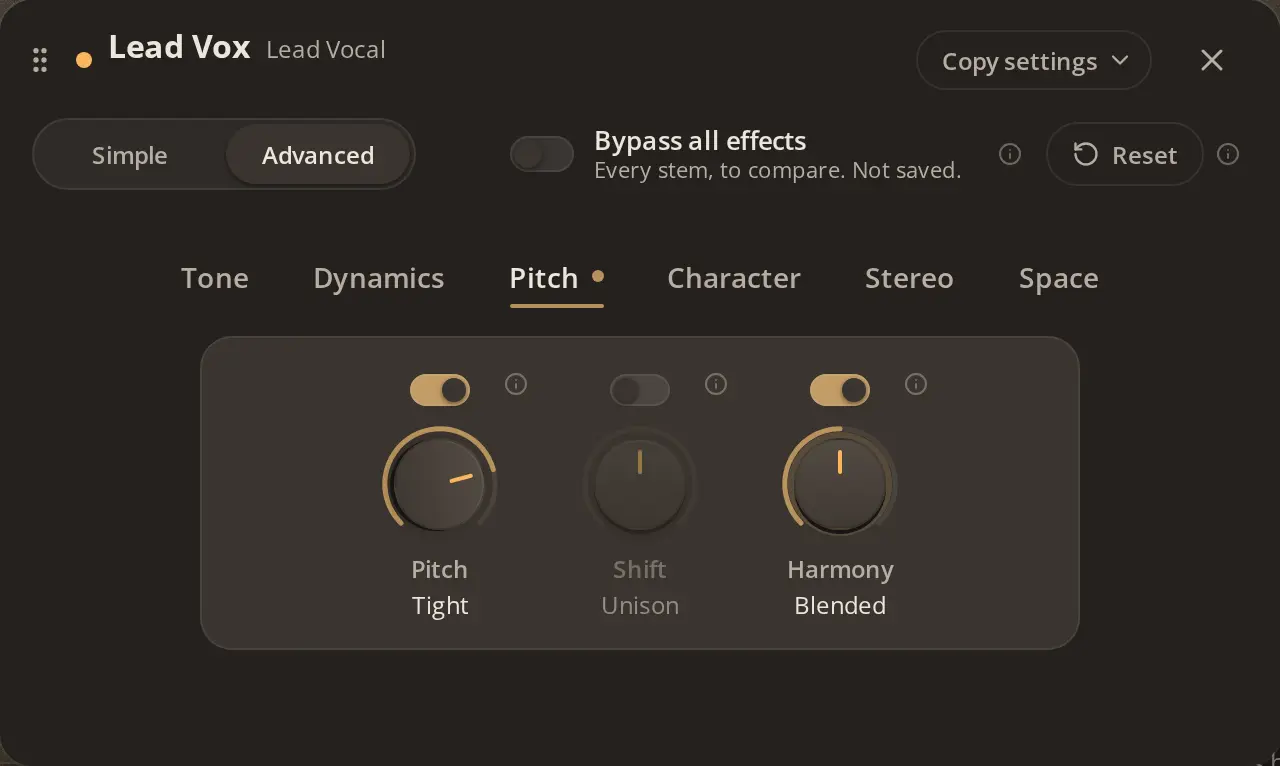
Each wheel has its own switch and shows one word for where it stands. All three are off until you switch them on.
Pitch
This is the tuning itself. The word under the wheel tells you what you get.
- Natural. Held notes that sit flat or sharp are moved into place. Your slides, scoops and vibrato stay as you sang them. Use it on a sung hook where nobody should notice tuning.
- Balanced. Everything you sing is pulled to its note. This is where the wheel starts, and it is the sound of most melodic rap: clearly in tune, still a voice.
- Tight. Notes sit on pitch with very little movement left.
- Hard tune. Every note is a flat line and notes change in steps. This is the robotic effect for trap hooks and ad-libs.
In a plugin you would set a retune speed and a key. Here the wheel is the speed, and the key is found for you from the beat.
Shift
Shift moves the whole voice up or down by steps of your song's key, up to an octave either way. Because it moves in the key, a third up stays in tune on every note.
Your voice is moved without being sped up, so it still sounds like you and not like a tape played too fast.
The best use in hip hop is the low double. If you recorded your hook twice, upload the second take as its own stem, shift it an octave down and pull its fader back. The hook gets weight.
Harmony
Harmony adds two voices made from your own take: one a third above you and one a fourth below, both in the key. They only sing where you sing, so your breaths and consonants do not pile up.
The word under the wheel is the level, from Faint to Full. Faint thickens a hook without anyone hearing a harmony. Full is a stack.
Tune your vocal, step by step
- Upload your stems. At least the vocal and the beat, as separate files, and confirm what each file is. If you are not sure what to export, read how many stems you need for mixing.
- Let it mix. Bandmixr balances the vocal against the beat and gives you a first mix.
- Open the mixer and press play. Click the gear on your vocal and choose Advanced. It opens on Pitch.
- Turn a wheel. The song keeps playing and you hear the change after a moment. "Bypass all effects" gives you the original back for comparison.
- Make the master. Whatever the wheels say is in the master. There is nothing to apply and nothing to export first.
The wheels save by themselves with the mix. Come back tomorrow and they are where you left them.
Five tips for rap and hip hop vocals
Upload the beat with the vocal. The key is read from the instruments. A vocal on its own can only be tuned to what it sings itself.
Record dry. No reverb or delay printed into the take. Echoes of the last note confuse any tuner and make the result rough. Add space after tuning, in the same mixer.
Tune hooks harder than verses. If your hook and your verse are separate stems, each has its own wheels. Balanced or Tight on the hook, Natural or nothing on the verse.
Give ad-libs their own stem. Hard tune on ad-libs with a clean lead is a classic contrast. It only works when the ad-libs are their own file.
Start low with Harmony. Faint or Soft on the hook is usually enough. If you hear a choir in a trap song, it is too loud.
What tuning cannot do
It cannot fix a melody that is wrong. A note that is closer to the wrong note gets pulled to the wrong note.
It works less cleanly on a take that is very breathy, distorted or recorded with the beat leaking in from speakers. Use headphones when you record.
A shift of a whole octave is an effect and sounds like one. That is the point of it.
Try it on your next song
If you bought your beat and have it as one file, mixing vocals over a beat you bought shows what to upload. If you produce in BandLab, here is how to export your stems from BandLab.
Then open Bandmixr, drop your vocal and your beat, and turn the Pitch wheel. Your first song is free.