
You recorded the whole rehearsal in one long take. Two hours, eight songs, plus the banter and tuning breaks in between. Now you need to cut it into individual songs.
Doing this manually in a DAW is tedious. You scrub through the timeline, find each gap, set markers, bounce each section. For 8 songs across 8 stems, that's 64 individual exports. It takes forever.
Bandmixr's Rehearsal Cutter does this automatically.
How the Rehearsal Cutter works
The tool runs entirely in your browser. Your files never leave your device. Here's the process:
Step 1: Select your files
Upload your long recording. This can be a single stereo file (one mic or a mixdown) or a full set of multitrack stems. If you upload multitrack, all stems are analyzed together so the cuts are consistent across every track.
Step 2: Automatic analysis
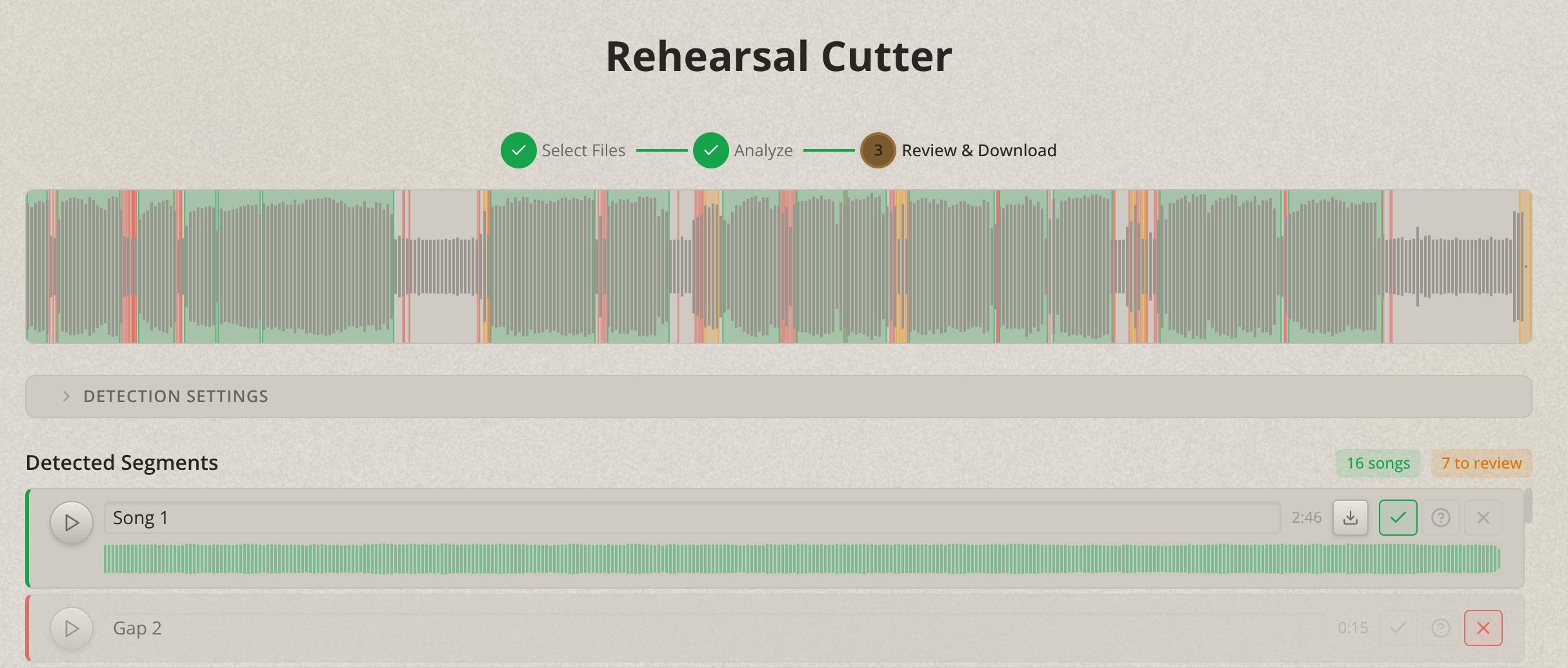
The Rehearsal Cutter scans the audio for energy levels across time. Songs have energy. Gaps between songs (tuning, talking, silence) don't. The algorithm detects these transitions and proposes segment boundaries.
Nothing gets uploaded to a server. For musicians who are protective of unreleased material, this matters. Also your trashtalk in between will not get leaked ;-)
Step 3: Review and adjust
You'll see a visual timeline showing the energy profile of your entire recording. Each detected segment (song) is highlighted with start and end markers.
Step 4: Export
Download individual segments as separate files. If you uploaded multitrack stems, each segment exports as a set of stems, all correctly aligned and trimmed.
From there, you can create a Bandmixr project for each song and upload the trimmed stems for mixing.
Tips for better results
Leave gaps between songs. Even 5 seconds of relative silence between songs makes detection much more reliable. Tell the band to stop playing fully between songs instead of noodling straight into the next one.
Record from the first note. If you hit record mid-song, the first segment might be incomplete. Start recording before the band starts playing.
Keep consistent levels. If one song is played at whisper volume and the next is full blast, the energy detection has a harder time finding clean boundaries. Consistent volume across the session produces cleaner cuts.
Use multitrack when possible. A single stereo room recording works, but multitrack stems give you much better results because the combined energy profile is more distinct. Drums and bass provide clear rhythmic energy that makes song boundaries obvious.
Who this is for
The Rehearsal Cutter is built for bands that record every rehearsal or jam session as one long take. Instead of spending an evening in a DAW chopping up files, you spend five minutes in the browser and have individual songs ready for mixing.
It's also useful for live recordings. If you tracked a full set through a multitrack board, the Rehearsal Cutter splits it into individual songs, ready for post-production.
The Rehearsal Cutter is available for free